Models
The Models page enables model alias mapping and provider decoupling in Aegis.
Instead of hardcoding vendor-specific model identifiers (such as publishers/google/models/gemini-1.5-pro-002 or gpt-4o-2024-08-06) directly into your application codebase, developers invoke clean, platform-managed Model Aliases (such as gemini-flash or gemini-1.5-pro).
Why Use Model Aliases?
- Zero-Downtime Hot Swapping: Switch an alias from one provider or model version to another in the Aegis Console instantly without deploying new code.
- Fallbacks & Redundancy: Map aliases to primary and fallback providers so traffic automatically reroutes during upstream provider outages.
- Cost Optimization: Direct non-critical tasks to lightweight aliases (
gemini-flash) while routing complex reasoning requests to high-capacity aliases (gemini-pro).
Model Alias Configuration
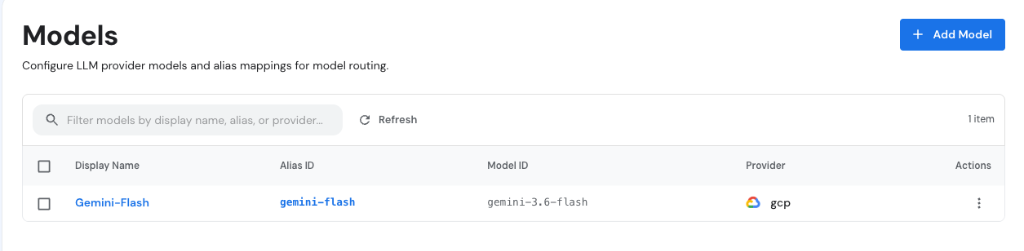
Navigate to Gateway > Models in the Aegis Console to inspect active model aliases, provider bindings, and model IDs.
Adding a Model to a Provider
- Navigate to Gateway > Models in the Aegis Console.
- Click + Add Model in the top right.
- In the modal dialog, configure the model properties:
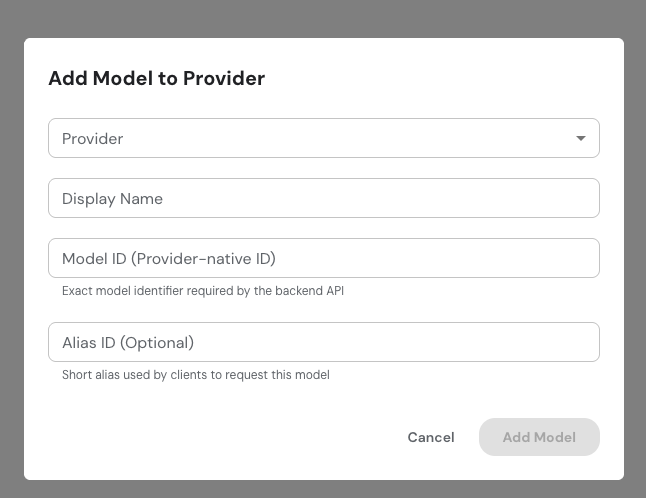
- Provider: Select the linked cloud provider connection (e.g.,
gcp). - Display Name: Enter a human-readable display label (e.g.,
Gemini-Flash). - Model ID (Provider-native ID): Enter the exact model identifier required by the backend API (e.g.,
gemini-3.6-flash). - Alias ID (Optional): Enter the short alias string used by client applications to request this model (e.g.,
gemini-flash).
- Click Add Model.
Model Mapping Table
The Models table lists all registered aliases across your active workspace:
| Field | Description | Example |
|---|---|---|
| Display Name | UI display label | Gemini-Flash |
| Alias ID | Short alias string used by clients | gemini-flash |
| Model ID | Provider-native model identifier | gemini-3.6-flash |
| Provider | Linked cloud provider credential | gcp (Google Cloud) |
| Actions | Edit mapping or delete model alias | — |
How Applications Resolve Model Aliases
When a client app or agent runtime sends an LLM completion request to Aegis:
POST /v1/chat/completions
{
  "model": "gemini-flash",
  "messages": [{"role": "user", "content": "Analyze transaction risk"}]
}
- Alias Lookup: Aegis intercepts
"model": "gemini-flash". - Provider Resolution: Resolves
gemini-flashto the linkedgcpprovider credential and upstream modelgemini-3.6-flash. - Governed Dispatch: Validates rate limits, injects Service Account OAuth tokens, logs trace spans, and forwards the request to Vertex AI.